
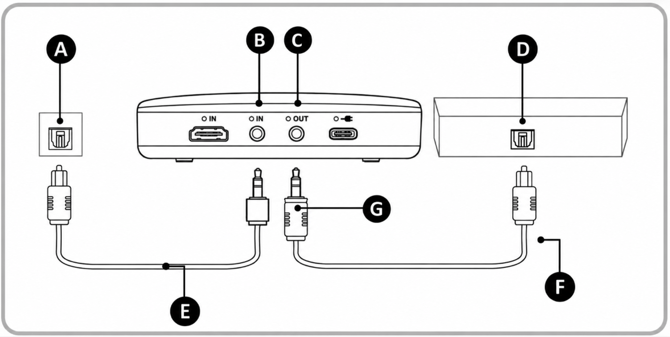
Legend
A: Digital Optical Output port (TV)
B: Audio IN: SPDIF / AUX Port (Audio Broadcaster)
C: Audio OUT: SPDIF / AUX Port (Audio Broadcaster)
D: Digital Output port (Soundbar)
E: Provided Digital Optical (SPDIF) Cable
F: Additional Digital Optical (SPDIF) Cable
G: Provided Digital Optical (TOSLINK to Mini-TOSLINK) Adapter
Note: you will need an additional Digital Optical Audio Cable for connection. If the Additional Digital Optical (SPDIF) Cable does not connect to the Audio out (SPDIF / AUX) Port on the Audio Broadcaster, please attach the provided Digital Optical (TOSLINK to Mini-TOSLINK) Adapter. (G)
1. Connect the Audio Broadcaster to the TV with the provided Digital Optical Audio cable
- Plug the square end of the Provided Digital Optical (SPDIF) Cable into Digital Optical Output on your TV, and the other end into the Digital In of your Audio Broadcaster.
2. Connect the Audio Broadcaster to the Soundbar with the additional Digital Optical Audio cable and Digital Optical (TOSLINK to Mini-TOSLINK) Adapter attached
- Plug one end of the cable into Digital Optical Input of your soundbar, and attach the Digital Optical (TOSLINK to Mini-TOSLINK) Adapter onto the other end of the cable to plug into the Digital Out on your Audio Broadcaster.